
Customer & partner portals
Organize the information and actions customers or partners need, including account access, requests, status, and relevant records.
web application development / Business technology
Web application development for customer portals, internal tools, and operational dashboards. Plan responsive interfaces, accessible workflows, and system integration.
A responsive customer portal connects task-focused screens to application services and existing business systems.
The business context
Web application development for customer portals, internal tools, and operational dashboards. Plan responsive interfaces, accessible workflows, and system integration.
A useful web application helps a person complete a task with confidence. Define the roles, information, and actions first; connect the interface to the business systems and operating model behind it.
Where we can help
Shape the scope around your current environment, users, and the work that needs to improve.
Organize the information and actions customers or partners need, including account access, requests, status, and relevant records.
Design task-focused interfaces for business teams, including queues, approvals, and record management suited to the agreed workflow.
Build layouts that reflow across screen sizes, with semantic structure, keyboard access, visible focus, and understandable form feedback.
Connect screens to the application services and data they require. Plan loading, empty, error, and permission states alongside deployment and handover.
A portal depends on more than its screens. API integration supplies the records and actions; custom application logic governs the workflow; cloud engineering supports deployment and operation.
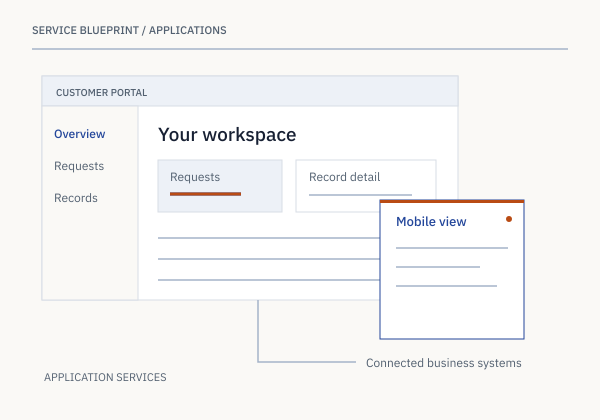
Illustrative engagement model, not a client case study. Scope and delivery responsibilities are agreed for each project.
Illustrative engagement / Web application development
A portal depends on more than its screens. API integration supplies the records and actions; custom application logic governs the workflow; cloud engineering supports deployment and operation.
How we start
Bring your current environment and the outcome you’re working toward. We’ll use that context to shape the first stage.
Let’s find a starting pointClarify the business need, who the system serves, the constraints, and what a useful result would look like.
Review the data, devices, applications, and infrastructure involved. Identify dependencies before choosing the approach.
Agree on a focused scope, how the work will be evaluated, and the operational responsibilities that follow.
Before we begin
A marketing website explains an offering. A web application lets someone perform work: manage records, submit requests, view account-specific information, or take action in a business process.
Device support is defined at the start. Responsive layouts and touch-friendly controls can support common tasks across phones, tablets, and desktop browsers; complex workflows should also be tested on their intended devices.
The integration assessment should establish available APIs, authentication, data ownership, and the actions the portal needs to perform. Those constraints inform both interface design and implementation.
The wider connection
U.S. presence / Since 2011
From Plainsboro, New Jersey, to Sunnyvale, California, we bring an established U.S. presence to your next technology project. Start with a direct conversation.
West Coast office
100 S. Murphy Avenue, Suite 200Let’s find a starting point
Tell us a little about your project and when you’d like to talk.